Tutoring centres
Your tutoring centre, with groups, attendance and payments in one place
Groups of four, one-to-one sessions, preparation for the Year 8 national exam and the school-leaving exam, freelance teachers. Kidy keeps attendance per session, invoices in e-Factura and online lessons, with no spreadsheets.
No card. Up to 25 children, Kidy is free for life.

A tutoring centre lives by seasons, not by the school year
September is quiet. From November the phone starts ringing: parents of Year 8 students, who sit the Evaluarea Națională (the national exam at the end of lower secondary), and of Year 12 students, who face the Bacalaureat (the school-leaving exam). By January the groups are full, and between the March mock exam and the June papers the centre is busy from lunchtime until evening. Summer brings a few catch-up students and the ones preparing for autumn.
Software that assumes a neat school year with a fixed start and end does not help much. What you need is something you can set up quickly: a new maths group from 1 December, three students for Romanian, a one-to-one slot on Tuesday at 6 pm. In Kidy you create the group with its days and times, mark it as in person, online or hybrid, and add the students. One student can join in January and another leave in April without you rebuilding anything.
Attendance is ticked per session, and parents are notified
In tutoring, every absence is an hour the teacher kept free. The teacher opens the group on a phone or computer and marks who came and who did not, all at once or one student at a time. The parent gets a notification, with the delay you choose, and the teacher gets a reminder if they forgot to mark.
Attendance is present or absent, marked per day. For one session a day that is exactly right. If a group has two sessions on the same day, they count as one day of attendance, which matters for billing, so in that case it is worth talking to us before you start.

Monthly or per-session fees come from the same fee plan
Some parents want a monthly fee for two sessions a week, others pay only for the sessions their child attended. Kidy supports both. In a monthly plan the fee is fixed. In a per-session plan the invoice counts the days the student was present in the previous month and multiplies by your price.
Discounts are set by hand on each student: two subjects at the same centre, two siblings, paying a whole term in advance. They do not apply by themselves. Generating the invoices is a button, and you check the list before anything is sent. You can also set a rule that reduces the fee for approved, justified absences, with a cap, but that is your choice.
One thing to know: Kidy does not have bundles of ten sessions with a balance that counts down. If you sell that way, we keep the payment record, but the count of remaining sessions stays outside the app.
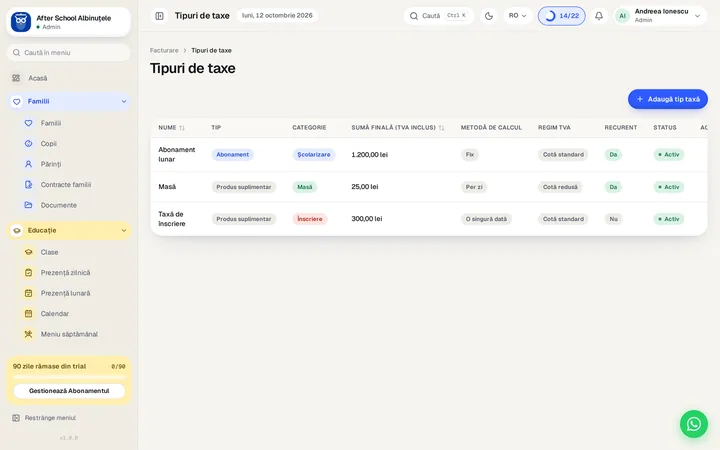
Invoices go into e-Factura, and parents pay without chasing statements
Invoices are sent from Kidy straight into e-Factura, Romania's national e-invoicing system, with no separate invoicing program in between. Each company of the centre has its own tax ID, series and bank account. How the tax rules apply to a centre, especially when you work with teachers who run their own sole-trader business or company, is a question for your accountant.
Parents get the invoice in the app and by email and pay by card, securely, or by bank transfer. You upload the bank statement to Kidy, which suggests matches with the invoices for you to confirm. Overdue reminders exist, in five steps around the due date, but they are off by default: you switch them on when you want.
If an adult student preparing for the school-leaving exam pays for their own sessions, you add them as an individual payer. For a child, the payer stays the parent.
Freelance teachers get their own account, but their pay stays with you
Tutoring centres usually work with teachers who come in for their hours rather than a fixed staff. Each teacher gets an account in Kidy, sees only their own groups and marks attendance. Permissions are set by role, and you can give one teacher the extra right to build the timetable.
You keep staff contracts in Kidy, under personnel, and make contracts with parents from Word templates: your company details fill in automatically, and you write in the subject, hours and fee. The parent signs on paper, you scan it and upload the signed PDF, because Kidy has no electronic signature.
What Kidy does not do is calculate what each teacher is paid. You enter the amounts, and the teacher then sees their payslip. If you pay per session taught, the calculation stays with you, in a spreadsheet or with your accountant.
Online lessons in the same app, on the web only
For students in another city or for evening sessions, Kidy Learn gives you online lessons in the same account. The teacher schedules a live lesson, students join from the web, and the teacher can share their screen and record the session. You can share materials and set homework with a deadline, then mark it with comments. Parents can see what the student has received.
The gradebook and the timetable are separate modules, with a fixed fee per institution: monthly for the gradebook, yearly for the timetable. Kidy Learn is an add-on to Kidy, with a monthly fee. All three work on the web only. The app in the App Store and Google Play, in today's version, does not have them, and students have no app of their own: they sign in with an account on the web. Kidy Learn has no tests or quizzes and no interactive whiteboard. For a centre that teaches maths on a virtual board, that matters.
The timetable is built by hand, in the editor or from an Excel import, and Kidy warns you when a teacher, a room or a group is double-booked. It does not generate the timetable on its own.
Questions about tutoring centres
What does Kidy not do for a tutoring centre?
It has no bundles of sessions with a balance, no scheduled make-up lessons, no calculation of teacher pay, no tests or exam simulations, no electronic signature, and no online booking or waiting lists. Students have no mobile app. If you need any of these every day, write to us before you start.
Can I invoice per session rather than per month?
Yes. A fee plan can count the days the student was present and multiply by your price per session. If a group has two sessions on the same day, they count as one day of attendance.
How does it work with teachers who have their own business?
Each teacher has an account in Kidy, their groups and their attendance. Invoices to parents are issued by the centre's company. If a teacher invoices you for their sessions, that invoice is not made in Kidy. How to split the tax side is a question for your accountant.
Can I teach students who live in another city?
Yes, through Kidy Learn (live lessons, materials and homework), on the web only. It is an add-on to Kidy, with a monthly fee, and it is not in the app from the stores.
Is it suitable for a single teacher who tutors alone?
It can be, for attendance, invoices and messages to parents, especially if you run groups. For a teacher with three students, a spreadsheet is simpler. Kidy starts to pay off from a few groups upwards, with several teachers.
Does Kidy work outside Romania?
Kidy is built on Romanian rules, such as e-Factura, SIIIR (the Romanian school register) and the Romanian marking system. Outside Romania these do not apply, so write to us before you start and we will see what suits you.
How do I move over from Excel or another program?
Migration is free and done by the Kidy team, from Excel, Kinderpedia, EduAgenda or Adservio. There is a 90-day trial with no card. The Free plan covers up to 25 children, for per-child plans.
Try Kidy with your team
Every feature, for 90 days. Under 25 children, Kidy is free for life.
Start your 90-day free trialNo card. Data migration is free and we do it for you.
Updated 8 November 2026